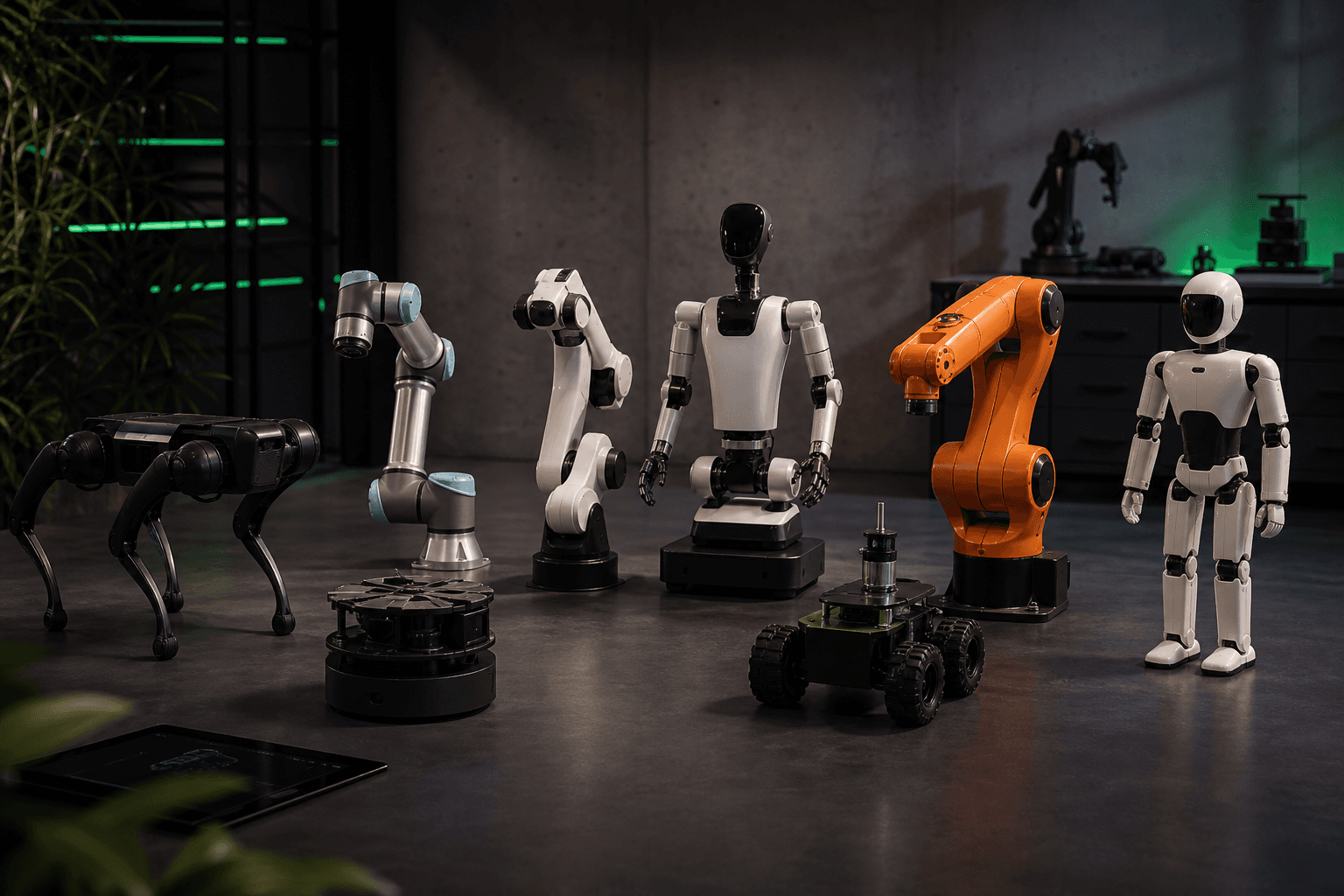
10 Robot Designs That Shaped Modern Robotics — And Where to Get Their URDFs
Why a Working URDF Shouldn't Cost You Two Weeks
You opened five GitHub tabs to source a UR5e URDF. Three forks list different joint limit values. Two have no collision meshes. The most-starred repo's last commit was 2021, against ROS 2 Foxy, which you stopped using eighteen months ago. This is the working reality for anyone selecting robot designs for simulation work, and it is the friction that quietly costs research labs months of engineering each year. Manufacturing robot deployments have grown roughly 85% over the past decade, according to EDI Weekly, yet the simulation infrastructure underneath that growth has not kept pace. The 10 robot designs covered here are foundational because they are teachable, reproducible, and — finally — verified in one place. By the end of this article, you have a comparison matrix, a fidelity checklist, and a selection briefing template you can apply to your next project.
Table of Contents
- What Makes a Robot Design "Canonical" in Modern Robotics
- The 10 Robot Designs — Specs, Use Cases, and URDF Availability
- The Anatomy of a Production-Ready URDF
- Industrial Arms vs. Legged Platforms vs. Dexterous Hands
- How URDF Hub Replaces the Scattered-Repository Workflow
- From Download to First Simulation
- FAQ: Modifying, Updating, Licensing, and Extending
- Your Robot Design Selection Briefing Template
What Makes a Robot Design "Canonical" in Modern Robotics
Canonical robot designs are platforms that achieved enough community adoption to become de facto reference points. They appear in textbook problems, RL benchmark suites like Meta-World and robosuite, ROS tutorial trees, and the reproducibility expectations of conference reviewers. Canonical does not mean best. The Willow Garage PR2 became canonical because the company gave it to research labs at no cost, not because its specs led the field. The Franka Emika Panda became canonical because its 7-DOF kinematics and integrated joint torque sensors at every joint enabled impedance control research that 6-DOF industrial arms structurally could not support.
Pieter Abbeel of UC Berkeley has repeatedly argued, in his talks on robot learning, that standardized platforms like the PR2 and Franka Panda were what enabled reproducible manipulation research — letting labs compare algorithms on common hardware instead of bespoke setups whose performance numbers no one else could replicate. Russ Tedrake of MIT, whose Robot Locomotion Group has spent more than a decade on contact-rich dynamics, has noted that high-fidelity models of contact and joint dynamics are essential for legged robots and dexterous hands, and that current modeling tools still struggle with what he calls "the last 10%" needed for reliable sim-to-real transfer — a position summarized in MIT MechE's overview of 21st-century robotics.
Four reasons canonical designs matter to you specifically:
- Reproducibility. Peer reviewers expect your simulation setup to be replicable. A custom CAD model with no published URDF is a red flag in a methods section.
- Dataset transfer. Pretrained policies, grasp datasets, and visual encoders target canonical platforms. Picking off-canonical hardware means you forfeit transfer.
- Hiring signals. Familiarity with the UR5e or Franka Panda is a portable skill. Custom one-off platforms do not list well on a CV.
- Sim-to-real pathways. Real hardware exists for canonical platforms, so your simulation work has a deployment destination instead of being trapped in a Gazebo window.
The counter-evidence is real and worth naming. A heavy focus on a handful of benchmark robots can narrow research diversity — a critique raised in position papers at RSS, ICRA, and NeurIPS. Canonical robot designs are a starting point, not a ceiling. Use them when reproducibility and transfer matter, and step off the canonical path deliberately when your research question requires it.
The 10 designs covered in the next section were selected on three criteria simultaneously: documented industrial or research adoption, citation frequency in top-venue papers from 2018 to 2024, and the existence of at least one URDF or XACRO source in active maintenance. Each design earns its inclusion by satisfying all three, not just one.
A robot design becomes canonical not because it is the best, but because it is the one researchers could actually build on without losing months to debugging.
The 10 Robot Designs — Specs, Use Cases, and URDF Availability
Use the table below as a triage tool. Match your project's payload, DOF, and simulator stack to a row — do not read the table top to bottom. All payload, reach, DOF, and repeatability figures are pulled from manufacturer datasheets (vendor sources). Verification, as referenced later in this article, refers to mesh integrity, joint limit accuracy against datasheet, and tested launches on Gazebo, NVIDIA Isaac Sim, PyBullet, and MuJoCo. The structural numbers matter: 6-DOF is the industrial baseline, dexterous hands typically run 16 to 24 DOF, and quadrupeds run 12 DOF (3 per leg), according to RoboDK's overview of industrial robot characteristics and the ROBOTS Guide taxonomy. These numbers drive URDF complexity more than any other single factor.
| Robot | Class | DOF | Payload | Notable Spec |
|---|---|---|---|---|
| UR5e | Collaborative industrial arm | 6 | ~5 kg | Repeatability ±0.03 mm |
| Franka Emika Panda | Collaborative research arm | 7 | ~3 kg | Torque sensors at every joint |
| KUKA LBR iiwa 14 | Lightweight industrial arm | 7 | 14 kg | Joint torque sensing |
| ABB IRB 1200 | Compact industrial arm | 6 | up to 7 kg | High-speed cycle times |
| Baxter / Sawyer | Dual-arm collaborative | 7 per arm | ~5 kg/arm | Series-elastic actuators |
| TurtleBot3 Burger | Differential-drive mobile base | 2 drive | ~0.5 kg | Lowest-cost ROS reference |
| Boston Dynamics Spot | Quadruped | 12 | ~14 kg | Dynamic locomotion on terrain |
| Unitree A1 | Quadruped (research) | 12 | ~5 kg | Speeds beyond human walking pace |
| Allegro Hand | Anthropomorphic gripper | 16 (4×4) | Finger-level | Tendon-driven joints |
| Shadow Dexterous Hand | Anthropomorphic gripper | 24 | Finger-level | Tendon coupling + optional tactile |
Reach data, separated for table-width reasons: UR5e ~850 mm, Franka Panda ~855 mm, KUKA iiwa 14 ~820 mm, ABB IRB 1200 up to ~900 mm. TurtleBot3 footprint is compact (sub-200 mm). Spot, Unitree A1, Allegro, and Shadow Hand are sized to human or sub-human scale rather than measured by reach.
Three worked examples for how to read this table:
Training a grasping policy you plan to deploy on real hardware? The Franka Panda's joint torque sensing at every joint is what makes its impedance control research-grade. A 6-DOF arm without torque sensing forces you to estimate contact forces externally, which adds noise to your policy and complicates sim-to-real. The Franka's 7th DOF gives you null-space redundancy for reaching around obstacles — a property the UR5e cannot reproduce regardless of how good your URDF is.
Building a ROS 2 course? The TurtleBot3 Burger's ~0.5 kg payload and compact footprint are not limitations — they are the point. Students can run it on a lab floor without safety choreography. Its URDF is short enough to read end-to-end in a single sitting, which is pedagogically valuable in a way Spot's URDF can never be. The ROBOTS Guide explicitly notes that simpler, low-cost platforms are often more effective for teaching kinematics, perception, and ROS tooling than advanced research robots.
Targeting sim-to-real on contact-rich tasks? Skip industrial arms and look at the Shadow Hand (24 DOF) or Spot (12 DOF). Expect the sim-to-real gap to dominate your engineering time — this is the frontier Tedrake's group has been chipping away at for years, and the ASME profile of Boston Dynamics frames legged robots as among the most advanced platforms in service precisely because their contact dynamics resist easy modeling.
One caveat carries forward into the next section: payload, reach, and DOF in this table reflect manufacturer specs. Whether your simulation actually reproduces those numbers depends on URDF fidelity — a separate question with its own checklist.
The Anatomy of a Production-Ready URDF
A URDF can technically load in Gazebo and still be unusable for serious work. The difference between a teaching toy and a production-ready model is six specific properties. This checklist exists because researchers in grasping, force control, and locomotion routinely lose weeks to URDFs that pass a visual sanity check but fail at simulation accuracy where it counts — under contact, under load, and under closed-loop control.
1. Collision Meshes That Match Visual Geometry. Without collision geometry approximating the visual mesh, simulators cannot detect contacts. Grasping experiments will pass through objects or trigger false collisions on empty space. Convex decomposition via V-HACD or a similar tool is the standard for balancing accuracy and physics performance. Models with missing or oversimplified collision meshes should fail peer review.
2. Joint Limits and Friction Coefficients Tied to Datasheet Values. Joint angle limits, velocity caps, and effort/torque maxima must match manufacturer specs. The UR5e's ±0.03 mm repeatability is meaningless if your URDF has the wrong joint speed limit. Friction coefficients on rotational joints determine whether your simulated grasp forces transfer to hardware — this is one of the most commonly miscopied URDF properties, and the silent failure mode that ruins published policy transfer numbers.
3. Sensor Definitions and Frames. Cameras, IMUs, and force/torque sensors must be declared as Gazebo plugins (or simulator equivalents), with correct mounting frames in the TF tree. Many community URDFs strip sensors entirely because the original contributor did not need them — leaving downstream users to reverse-engineer placements from photographs and CAD drawings.
4. Inertial Parameters: Mass, Inertia Tensors, Center of Mass. Per-link mass and inertia tensors drive dynamics simulation. Wrong inertia tensors will silently break impedance control, MPC, and any model-based controller. URDFs copied from CAD without recomputing inertia tensors after mesh simplification are a common failure mode, and there is no error message — your controller just behaves slightly wrong, all the time.
5. Documented Mesh Provenance and License. You need to know where visual and collision meshes originated and whether they are licensed for derivative use under MIT, Apache 2.0, or BSD terms. URDFs with no license are legal landmines for commercial work — many companies have re-engineered URDFs internally rather than risk shipping ambiguous IP.
6. A Tested Compatibility Matrix. A URDF that "works in Gazebo Classic" tells you nothing about Gazebo Harmonic, Isaac Sim, PyBullet, or MuJoCo. Verification requires explicit testing on each target. Every published model should declare which simulators and which ROS 2 distros (Humble, Iron, Jazzy) it has actually been launched against.
Why these six matter, concretely: sim-to-real papers in dexterous manipulation routinely report failures traced back to incorrect inertia tensors. Tedrake's "last 10%" of contact accuracy lives precisely in items 1, 2, and 4 of this checklist. Collision mesh fidelity directly determines whether grasp success rates in simulation map to hardware grasp success rates. There is also a format caveat worth being honest about: URDF itself has known limitations for high-fidelity contact and tendon-driven systems. Complex platforms like the Shadow Hand often require SDF, MJCF, or USD exports for full fidelity. A practical workflow publishes a canonical URDF and documents the format-specific exports needed for advanced contact work — the URDF is the source of truth for kinematics, not the final word on dynamics.
This is also why canonical robot designs win. They are high-visibility enough that the community has pressure-tested these six properties across thousands of users. A one-off custom robot URDF has no such error-correction loop, and its inertia tensors will stay wrong until someone publishes a paper that fails to replicate.
A URDF without collision meshes or sensor definitions is not a model — it is a stick figure, and your simulation results will not survive contact with hardware.
Industrial Arms vs. Legged Platforms vs. Dexterous Hands — Choosing Your Design Class
Before picking a specific robot, narrow to a design class. The three frontiers of modern robotics research — industrial manipulation, legged locomotion, and dexterous in-hand manipulation — have radically different learning curves, sim-to-real difficulty, and community maturity. Marc Raibert, founder of Boston Dynamics, has framed legged robots as a way to extend robotics into environments wheeled platforms cannot reach, justifying the field's investment in quadrupeds and bipeds (a position summarized in the ASME profile of Boston Dynamics' robots). Industrial arms have roughly 30 years of accumulated tooling. Legged and dexterous platforms have closer to 10 years of research-grade infrastructure, with sim-to-real being the active frontier.
| Design Class | DOF Range | Sim-to-Real Difficulty | Best Use Case Fit |
|---|---|---|---|
| Industrial Arms (UR5e, KUKA iiwa, ABB) | 6–7 | Low | Pick-and-place, force control, factory deployment |
| Mobile Bases (TurtleBot3) | 2 drive | Low–Medium | Navigation, SLAM, ROS 2 teaching |
| Legged Platforms (Spot, Unitree A1) | 12 | Very High | Locomotion, inspection, outdoor autonomy |
| Dexterous Hands (Allegro, Shadow) | 16–24 | Very High | In-hand manipulation, dexterous RL |

Industrial arms are the appropriate "hello world" of sim-to-real because their rigid-body dynamics are stable and predictable. RoboDK's overview notes the standardization around 6-DOF kinematics, repeatability of ±0.02 to 0.1 mm, and duty cycles designed for continuous multi-shift operation — these are the conditions under which simulation results most reliably transfer. If you are new to ROS 2 simulation, an industrial arm gets you to a working pipeline in days, not months. Rodney Brooks' original argument for collaborative arms — that platforms like Baxter were designed as safe, trainable co-workers rather than fenced industrial machines — is what made cobots the entry point for academic manipulation research in the first place.
Mobile bases are the appropriate teaching platform. TurtleBot3's URDF is short enough to read in 10 minutes, which is pedagogically valuable in a way Spot's URDF cannot be. Differential-drive kinematics are well understood, wheel slip is a solved modeling problem at the fidelity teaching usually requires, and the cost is low enough that a department can equip a full lab cohort.
Legged platforms are the research frontier, and they are difficult. High DOF, contact-rich, chaotic terrain interactions. Sim-to-real gaps are pronounced: fixed simulation time steps on the order of 0.5 to 2 ms are typically needed for stable contact simulation, as discussed in MIT MechE's robotics overview. The publishable upside is real — novel locomotion contributions land at top venues — but the engineering investment is months, not weeks. Start with Unitree A1 in simulation before committing to a Spot procurement.
Dexterous hands are the hardest class. The Shadow Hand's 24 DOF with tendon coupling and finger contact modes that no current simulator perfectly captures means your sim-to-real RL pipeline will spend most of its time on the contact model, not the policy. But the research payoff is real: dexterous RL is one of the most active areas in the field. Start with the Allegro Hand at 16 DOF before stepping up to the Shadow Hand.
The explicit recommendation logic: beginners pick industrial arms. Educators pick mobile bases. Established researchers with sim-to-real budgets pick legged or dexterous. That ordering reflects engineering cost, not ambition.
How URDF Hub Replaces the Scattered-Repository Workflow
The status quo for sourcing robot designs in simulation form is fragmentation. Researchers pull URDFs from at least four places: the ros-industrial GitHub organization, individual lab forks, the Gazebo app catalog, and MuJoCo Menagerie (which is MuJoCo-only). A PhD student commonly spends one to three weeks per new robot reconciling joint limits across forks, fixing collision meshes, adding sensor plugins, and writing launch files that work against the current ROS 2 distro. Compounded across a lab of eight students, that is months of duplicated engineering per year, and none of it is publishable.
URDF Hub addresses this through five concrete mechanisms, each of which targets a specific failure mode in the scattered workflow.
Verified models, peer reviewed. Every model passes a verification pipeline that tests load-in across Gazebo, NVIDIA Isaac Sim, PyBullet, and MuJoCo. Maintainers flag missing meshes, joint limit mismatches against datasheets, and missing inertia tensors before merge. Most existing repositories are first-come, no curation — the first person to upload a URDF defines what everyone else inherits, including their mistakes.
ROS 2 native across Humble, Iron, and Jazzy. Launch files are included. The user runs ros2 launch urdf_hub franka_panda_gazebo.launch.py and gets a working simulation. No digging through five-year-old wiki pages, no guessing which controller_manager configuration is current for your distro, no porting effort from a Foxy-era tutorial that assumes deprecated APIs.
Pre-tested simulator coverage. Gazebo, Isaac Sim, PyBullet, and MuJoCo. The tested compatibility matrix is published per model so you do not gamble on "should work." This matters because simulator-specific behavior under contact, friction, and sensor noise diverges in ways that only show up when you start collecting data.
Sensor configurations bundled. Camera frames, IMU configs, and force/torque sensors declared and tested. The gap between "the URDF loads" and "the sensors publish topics" is the silent killer of academic simulation projects — a working URDF with no working camera feed is not a working simulation, and reverse-engineering sensor placements from manufacturer photographs is a poor use of your week.
Single licensing standard. MIT and Apache 2.0 across all models. No ambiguity for commercial derivative work, no hunting through abandoned forks for original authors to ask permission. Industrial users get a clean IP story; academic users get freedom to redistribute their modifications.
The competitive landscape, named specifically rather than dismissed:
- The Gazebo app catalog hosts models, but verification is limited and documentation guarantees are minimal. A model present in the catalog does not mean a model tested against your simulator version.
- MuJoCo Menagerie is excellent for MuJoCo-specific work and is the right starting point if you are committed to MuJoCo, but it is not ROS 2 native and not multi-simulator.
- ros-industrial GitHub is strong for industrial arms but narrow in class coverage; it does not extend to legged or dexterous platforms.
- Scattered GitHub repositories like
robot-assetsandurdf_files_datasetare useful as raw inputs but uncurated. Collision meshes and sensors are inconsistent, and license documentation is patchy.
URDF Hub's position is the intersection of three properties: ROS 2 first, multi-simulator, peer-reviewed. That triple does not exist elsewhere in one place. This ties back to the canonical-designs argument: canonical platforms deserve canonical URDFs, and the absence of the latter has been a quiet drag on the field for a decade.
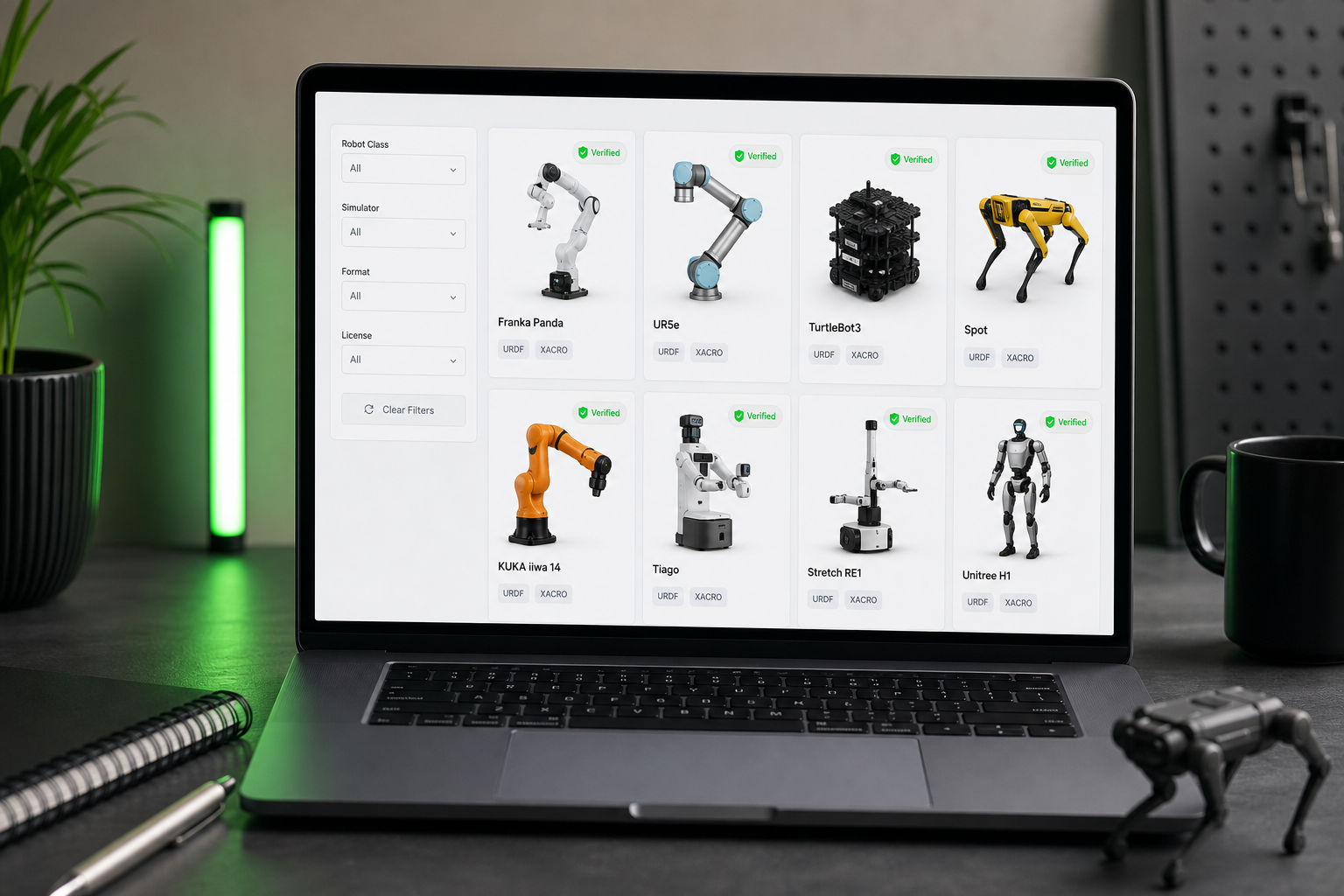
A centralized, verified URDF repository does not sound exciting until you have spent a week debugging a missing collision mesh that should have been caught in peer review.
From Download to First Simulation — The Workflow
The concrete workflow for taking a canonical robot from catalog to running simulation. Target outcome: arm spawned, sensors publishing, TF tree complete, in under 10 minutes. The assumption is that you already have ROS 2 (Humble, Iron, or Jazzy) and one of Gazebo, Isaac Sim, PyBullet, or MuJoCo installed.
Step 1 — Browse and download the model. Filter by robot class (arm, mobile, legged, hand) and simulator. Click your target robot — for example, the UR5e — and download the bundle. The download includes the URDF file, XACRO templates, visual meshes (.dae or .stl), collision meshes, sensor configurations, and a README.md. Unzip into your ROS 2 workspace:
cd ~/ros2_ws/src/
unzip ~/Downloads/ur5e_urdf_hub.zip -d urdf_models/
Step 2 — Read the README for simulator-specific setup. Each model documents simulator-specific dependencies. The Franka Panda flags that libfranka is required for accurate joint friction in Gazebo. The Spot port notes the simplified motor model used (research, not production). Reading this step prevents the most common failure modes — about 80% of "it doesn't launch" issues are documented in the first two paragraphs of the README.
Step 3 — Build the workspace.
cd ~/ros2_ws/
colcon build --packages-select urdf_hub
source install/setup.bash
Step 4 — Launch the simulation. Use the provided launch file. For the UR5e in Gazebo:
ros2 launch urdf_hub ur5e_gazebo.launch.py
The launch file handles physics initialization, controller spawning, and sensor activation in the correct order. You do not need to chain gazebo_ros_pkgs includes or manually start the controller_manager.
Step 5 — Verify the TF tree and sensor topics.
ros2 run tf2_tools view_frames
ros2 topic list
Confirm that all expected joint frames publish and that expected sensor topics appear — for example, /franka/end_effector_sensor/wrench for the Panda's wrist sensor. If the TF tree is incomplete, you have an environment problem, not a model problem.
Step 6 — Start your experiment. Write your controller, planner, or RL environment against the verified joint and sensor API. The URDF is pre-tuned for the specified simulator — avoid editing the URDF directly. If you need a custom payload or a swapped end-effector, use the XACRO parameter substitution pattern documented in the README rather than hand-editing the compiled URDF.
If a step fails, the first stop is the model's README troubleshooting section, not the URDF. Verification means the model is correct on the tested matrix — local failures are almost always environment, not model.
FAQ — Modifying, Updating, Licensing, and Extending Canonical Robot Designs
Can I modify a URDF Hub model to add a custom end-effector or payload?
Yes, and the recommended path is XACRO parameter substitution rather than direct URDF editing. Every model ships with XACRO templates that expose payload mass, end-effector mount, and (where applicable) sensor toggles as parameters. For a custom gripper, add a new XACRO macro for your gripper and include it via the standard end-effector mount frame defined in the parent robot's XACRO. Direct URDF edits are discouraged because they bypass the verification work — the URDF is the compiled output, not the source. Edit the XACRO, regenerate, and you keep your modifications portable.
How often are models updated, and how do I stay synced?
Models are versioned. Updates are triggered by upstream datasheet changes, simulator API changes (for example, Gazebo Classic to Gazebo Harmonic, or ROS 2 distro transitions), or community-reported issues that pass triage. Watch the repository for releases or pin to a specific model version in your project's package.xml to avoid unexpected breakage mid-experiment. The verification pipeline re-runs on every update — a new version means the model passed Gazebo, Isaac Sim, PyBullet, and MuJoCo checks against current ROS 2 distros at the time of release.
Can I use these URDFs in commercial products?
Yes. Every model is licensed under MIT or Apache 2.0, both of which permit commercial use, modification, and redistribution. Each model's documentation lists the license, mesh provenance, and any third-party attribution requirements. This explicitly distinguishes the catalog from many GitHub forks where license files are missing or ambiguous — a state that is a legal liability for commercial robotics work and that has historically forced companies to re-engineer URDFs internally rather than risk shipping ambiguous IP in a product.
What if the robot I need is not in the current catalog?
Two paths. Short term: open a request describing the robot, datasheet links, and your use case. Maintainers prioritize based on community demand and datasheet availability. Long term: contribute the model. Community submissions are accepted when they pass the verification pipeline — collision meshes present, joint limits matching the datasheet, sensors declared, tested launches on the supported simulator matrix. Contribution criteria are documented, and the bar is the same standard the existing 50+ models meet. Submitting a model that meets the standard is itself a citable research contribution.
Your Robot Design Selection Briefing — A Template You Can Apply Today
A structured briefing template. Copy it into your project notes, fill in the blanks for your specific use case, and use it to justify your robot choice to collaborators, advisors, or stakeholders. It encodes the decision logic from the design table and the class matrix into a question sequence — answering all five blocks gives you a defensible robot selection.
ROBOT DESIGN SELECTION BRIEFING

BLOCK 1 — PROJECT SCOPE
  Time horizon:           [ prototype 3-6 mo / production 12+ mo ]
  Deployment target:      [ simulation only / sim-to-real / hardware-first ]
  Team familiarity:       [ new to ROS 2 / experienced / mixed ]

BLOCK 2 — PERFORMANCE REQUIREMENTS
  Payload required:       _____ kg
  Reach / workspace:      _____ mm
  DOF needed:             [ 6 baseline / 7 for null-space / 12+ legged / 16-24 dexterous ]
  Sim fidelity must-haves:
    [ ] Joint friction modeling
    [ ] High-fidelity collision meshes
    [ ] Sensor simulation (camera / F-T / IMU)
    [ ] Motor / actuator dynamics
    [ ] Contact-rich physics (tendons, finger contacts)

BLOCK 3 — SIMULATOR & ROS ECOSYSTEM
  Primary simulator:      [ Gazebo / Isaac Sim / PyBullet / MuJoCo ]
  ROS 2 distro:           [ Humble / Iron / Jazzy ]
  Community size needed:  [ large ecosystem required / verified model sufficient ]

BLOCK 4 — DESIGN CLASS SELECTION
  Match scope to class:
    [ ] Industrial Arm (UR5e, KUKA iiwa 14, ABB IRB 1200)
        — Payload 3-14 kg, sim-to-real planned, predictable dynamics
    [ ] Collaborative Research Arm (Franka Panda, Baxter / Sawyer)
        — Force control, learning-from-demo, joint torque sensing
    [ ] Mobile Base (TurtleBot3 Burger)
        — Navigation, SLAM, ROS 2 education
    [ ] Legged Platform (Spot, Unitree A1)
        — Terrain, gait learning, outdoor autonomy
    [ ] Dexterous Hand (Allegro, Shadow)
        — In-hand manipulation, dexterous RL

BLOCK 5 — 48-HOUR VALIDATION
  [ ] Download selected model from the verified catalog
  [ ] Run: ros2 launch urdf_hub [robot]_[simulator].launch.py
  [ ] Confirm: simulator launches, sensors publish, robot moves on command
  [ ] If yes -> lock in selection. If no -> consult README, not URDF.

OUTCOME: A robot design backed by research maturity, community support,
and verified simulation fidelity. Your results will be reproducible.
The point of the template is not that you fill in every blank perfectly the first time. The point is that the questions force you to make implicit assumptions explicit. A PhD student who answers Block 2 honestly will realize they need a Franka Panda rather than a UR5e because their work requires joint torque sensing. A startup engineer will realize a TurtleBot3 covers 90% of their navigation prototype needs and they were over-buying. Robot designs become tools the moment you stop treating them as preferences and start treating them as decisions you can defend in a review meeting.